
Move files and fodler from a pool to another one (more complex than I thought)
Ok.
So I have this situation.
I use Freenas with 2 pools.
- One for my media and files
- Other one for downloading legitimate torrent files
I use a software I don't recall the name (call it thing*daar) to handle the search and download of the torrent files. It download them using a torrent client (Transmission) and copy them when finish to the pool where the files are.
But that make no real sense since it needs to copy the file so I have it twice and that I cannot use symlinks because NFS does not allow this in 2 separate pools.
As backup of those two pools, I use syncthing that sunc those 2 "folders" into another NAS (based on openmediavault and a RPI4).
So I need to plan the move carefully
- Stop syncthing to sync for a while
- Move the files from pool A to pool B to have this folder structure:
Before:
\_POOL_A
\_Download
\_POOL_B
\_Media
After:
\_POOL_B
\_Downloads_A
\_Media - Reconfigure my transmission docker config tthat use NFS to point this new location
Transnmission will be maybe a little confused about this so maybe we will need to re-locate the download if it complains - Do a file cleanup (so remove any duplicate and/or created symlinks from Download_A to Media
- Reconfigure syncthing to only sync 1 folder/pool instead of 2
I guess that I need to list here the different components/vms and how they access the pools
- transmission vm
- nas_ip:/mnt/vol1/pool_a >> /downloads
- rancher pod thing*daar
- /media >> storage | nfs_media (nas_ip:/mnt/vol1/media)
- synchting freenasyyhkk
- synchting raspberrypie
2023-09-16:
So THIS weekend is THE weekend.
I have decided that this little project should go out of my mind for good :)
Let's start the journey by checking one little thing first: Do we have any space in the POOL_B to copy/move the files? In fact.. do we have enough free space at all??.
Let'S check this:
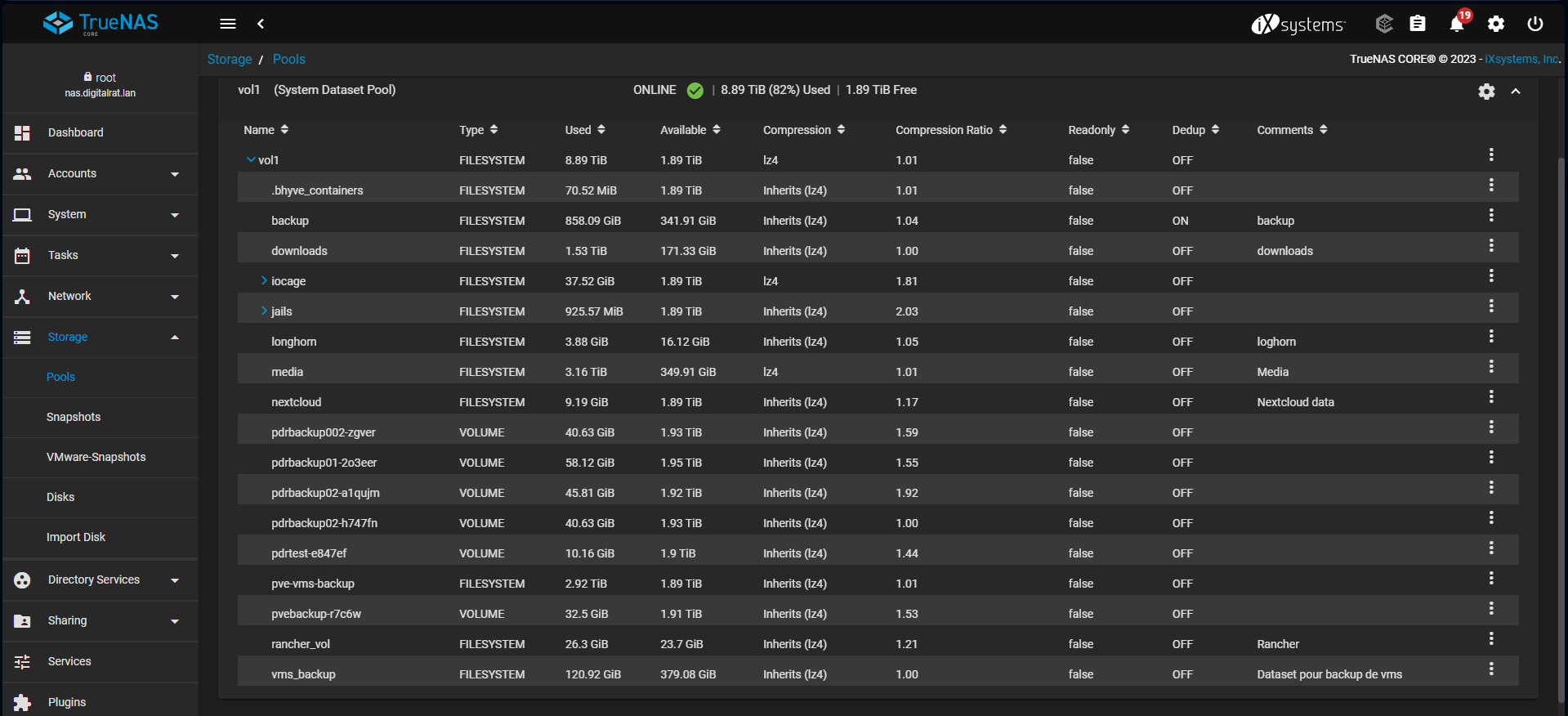
Ouch... 1.8T free and the POOL_A is 1.5T.
...
Well, still I can make it!!! Anyway, as soon as the copy/move is done I can recover the space so that's good.
Now another question is: where I will do the copy command? Like in a screen session on the truenas box? That could make it....
Let's do it!
- First let stop the transmission client so it will not write while we play with this
That part is done in portainer since it got the pod configured there On the nas:
root@nas[~]# screen
root@nas[~]# mkdir /mnt/vol1/media/Media/downloads
root@nas[~]# rsync -avPh /mnt/vol1/downloads/* /mnt/vol1/media/Media/downloads/